

How to Calculate Click Through Rate (CTR): My Simple Guide
Hello guys, welcome back to my blog. Many of you ask me how to calculate click through rate for your website, and honestly it is very easy. But the real problem is understanding what that number means for your SEO. So today I will show you the formula, and I will also show you real data from my own website rahuljoshiseo.com. No fake examples, only my real Google Search Console numbers.
How to Calculate Click Through Rate – The Basic Formula
CTR means click through rate. It tells you how many people clicked your page after seeing it in Google search results. The formula is very simple:
CTR = (Total Clicks ÷ Total Impressions) × 100
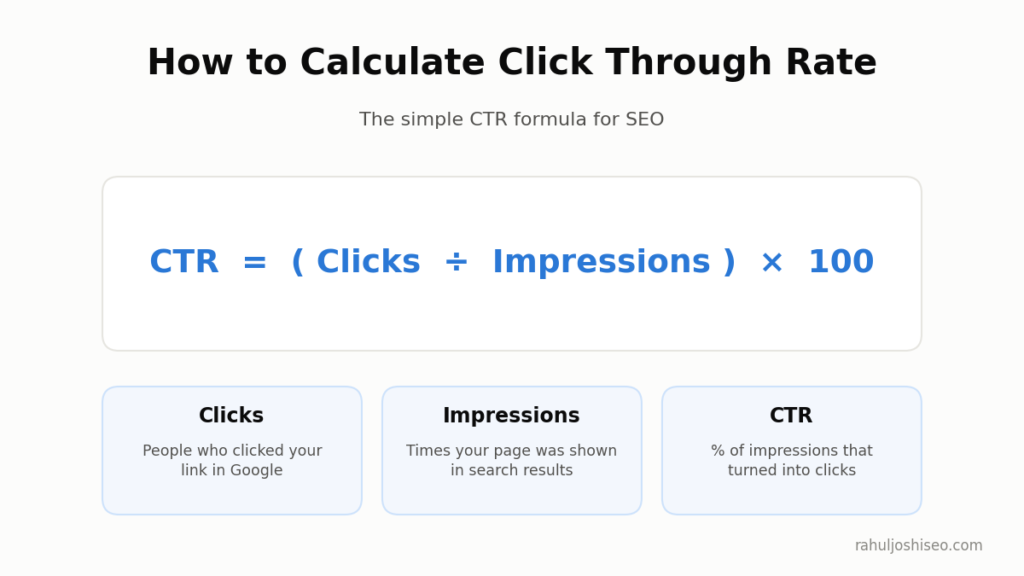
That’s it guys. You divide clicks by impressions and then multiply by 100 to get the percentage.
| Term | What It Means | Where You Find It |
|---|---|---|
| Clicks | How many times people clicked your link in Google | Google Search Console |
| Impressions | How many times your page was shown in search results | Google Search Console |
| CTR | Percentage of impressions that turned into clicks | Google Search Console (Average CTR) |
| Average Position | Your average ranking spot on Google | Google Search Console |
One thing I want you to remember. An impression does not mean the user actually saw your link. It only means your link was there on the search results page. For example, if your page is ranking on position 10, it is still on first page of Google, so Google counts the impression. But many users click on top results and never scroll down till the bottom, so they never really see your link.
Real Example: My Own Website rahuljoshiseo.com
Now let me show you my own numbers. I took this screenshot from Google Search Console Performance report for last 3 months.
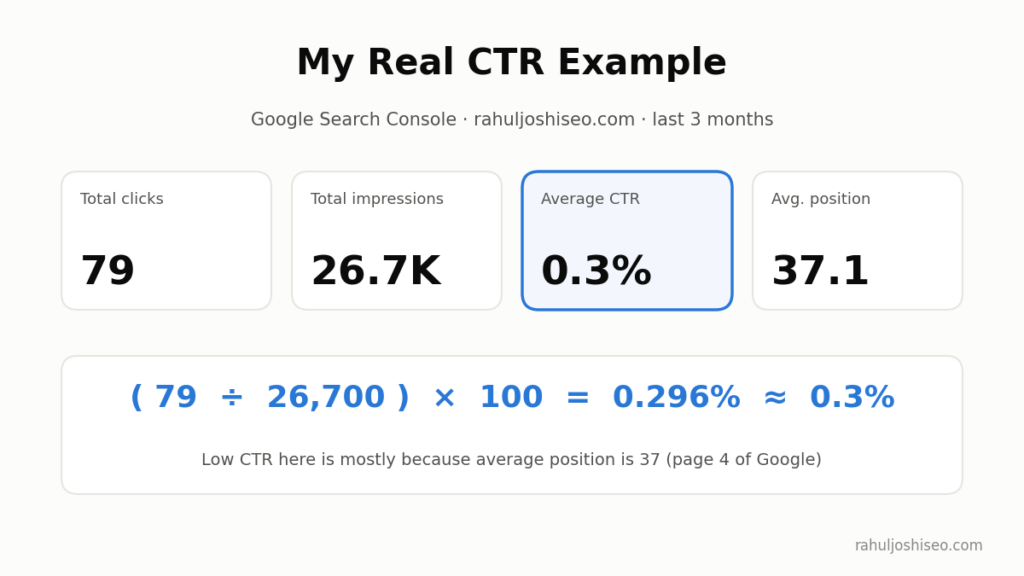
| Metric | My Data (Last 3 Months) |
|---|---|
| Total Clicks | 79 |
| Total Impressions | 26,700 |
| Average CTR | 0.3% |
| Average Position | 37.1 |
So let’s do the maths together:
CTR = (79 ÷ 26,700) × 100 = 0.296%
When we round it off, it comes to 0.3%. Same as Search Console shows. So you can see guys, the formula works exactly how Google calculates it.
Why My CTR Is So Low
Honestly, 0.3% CTR looks very bad at first. But if you ask me, the real reason is my average position. 37.1 means most of my pages are sitting on page 4 of Google. Very few people go that deep in search results.
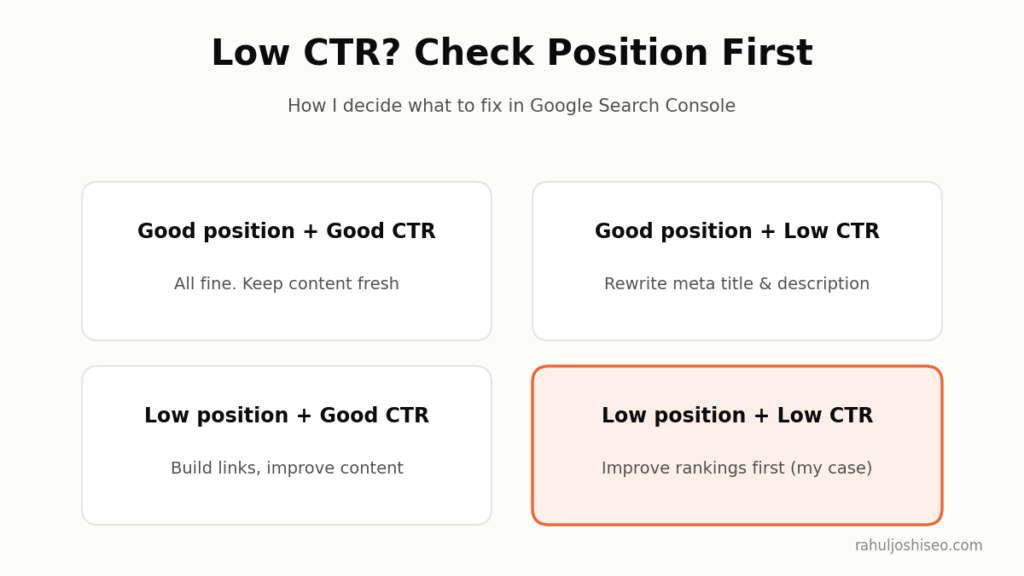
So in my case, the problem is not my meta title or meta description. The problem is ranking. This is why I always say, never look at CTR alone. Always check it with average position.
What Is a Good Organic CTR by Position?
There is no one “perfect” CTR number. It depends on your ranking position, search intent, device and SERP features. According to The Stacc, which compiled 6 major studies, position 1 on Google gets between 19% and 39.8% of clicks, with an average near 27%. Position 2 drops to about 15%, and position 10 is under 2%.
| Google Position | Average Organic CTR (Approx) |
|---|---|
| Position 1 | 19% – 39.8% (depends on study) |
| Position 1 with AI Overview | ~9.7% |
| Position 2 | ~15% |
| Position 6 and below | Under 1% (AWR data) |
| Position 10 | Under 2% |
| Position 37 (my site) | 0.3% |
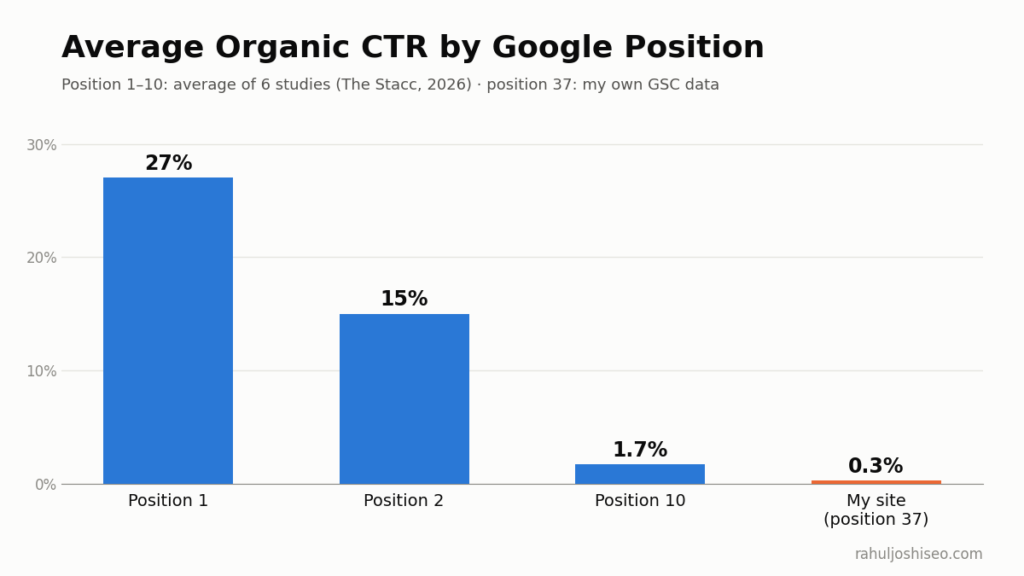
Some facts I found very interesting:
- The Advanced Web Ranking 2026 study shows position 1 averages 20% organic CTR, but only 9.7% when an AI Overview is on the page.
- In the same data, positions 1 to 3 take roughly 92% of the clicks that reach the top ten results.
- An Ahrefs study from February 2026 looked at 300,000 keywords and found AI Overviews are linked with a 58% drop in CTR for top ranking pages, as reported by OuterBox.
I think this clearly shows why ranking in top 3 is so important. Page 1 is good, but top 3 is where real traffic comes.
How to Check CTR in Google Search Console
It’s very easy guys, just follow these steps:
- Open Google Search Console and select your website.
- Click on Performance then Search results.
- Tick the boxes for Total clicks, Total impressions, Average CTR and Average position.
- Choose date range, I use 3 months because it gives more stable data.
- Scroll down and check Queries and Pages tab to see CTR for each keyword and page.
I really like the Pages tab because it shows which page has high impressions but low clicks. Those pages are your quick wins.
Common Mistakes When Reading CTR
| Mistake | Why It Is a Problem | How I Fix It |
|---|---|---|
| Looking only at site-wide CTR | Low ranking pages pull the average down | Check CTR page by page and query by query |
| Ignoring average position | Low CTR at position 40 is normal | Always compare CTR with position |
| Using short date range | Few days data is not reliable | Use 28 days or 3 months data |
| Ignoring AI Overviews | Google answers the query on SERP itself | Check which keywords show AI Overview |
| Counting branded keywords together | Brand searches have very high CTR | Filter brand and non-brand queries separately |
How I Plan to Improve My CTR
From my own data, I have made a simple plan. Maybe it will help you also. Before you fix anything, first check which box your page falls in. Show Image
1. Improve rankings first. My average position is 37, so first I need to push pages to page 1. I am working on better content, internal linking and some good backlinks.
2. Rewrite meta titles. For pages already on page 1, I add numbers, the current year and a clear benefit in the title. Something like “7 Easy Ways…” gets more attention then a plain title.
3. Write better meta descriptions. Google does not always use it, but when it does, a clear description helps people decide to click. Google explains this in its own snippet guide.
4. Target long-tail keywords. Small keywords have less competition, so I can rank higher and get better CTR faster.
5. Try to get featured snippets and AI citations. Give short and direct answers under headings, just like I gave the CTR formula at top of this post.
6. Add schema markup. Structured data can make your result look bigger and richer on the SERP.
FAQs
What is the formula to calculate CTR?
CTR = (Clicks ÷ Impressions) × 100. For example 79 clicks from 26,700 impressions gives 0.3% CTR.
Is 0.3% CTR bad for SEO?
It depends on your position. At position 37 it is normal. At position 1-3 it would be very bad and you should fix your title and description.
What is the difference between CTR and conversion rate?
CTR tells how many people clicked your result. Conversion rate tells how many of them did the final action, like filling a form or buying something.
How often should I check CTR for SEO?
I check it once a month in Google Search Console. Daily data jumps up and down too much for SEO.
Does CTR affect Google rankings?
Google never clearly confirmed it. But higher CTR means more traffic from same ranking, so it is always worth improving.
Final Words
So guys, this was my simple guide on calculating CTR from an SEO point of view. I showed you the formula, my own real data from rahuljoshiseo.com, CTR benchmarks by position and my plan to improve it. My main advice is, don’t panic when you see low CTR. First check your average position, then decide what to fix. Keep on visiting rahuljoshiseo.com for more SEO tips.
Sources: